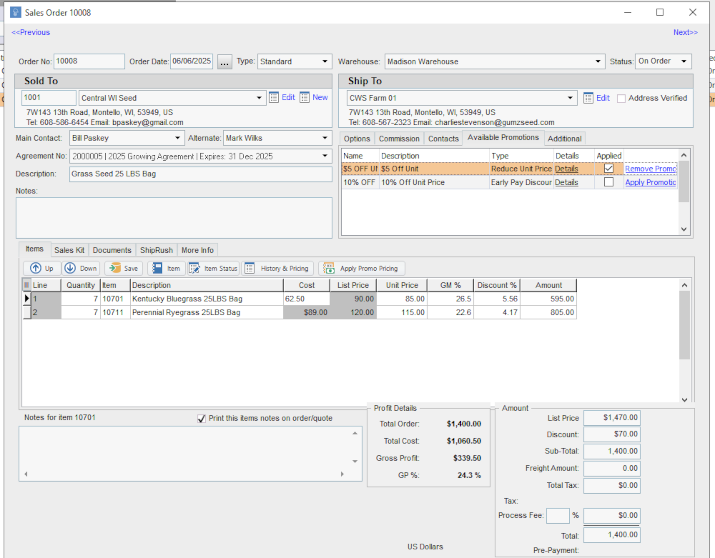
We are using Proceed Software and I'm trying to understand how the promotions work and how they are applied to the Sales Orders, can someone please explain this?
1 Answers
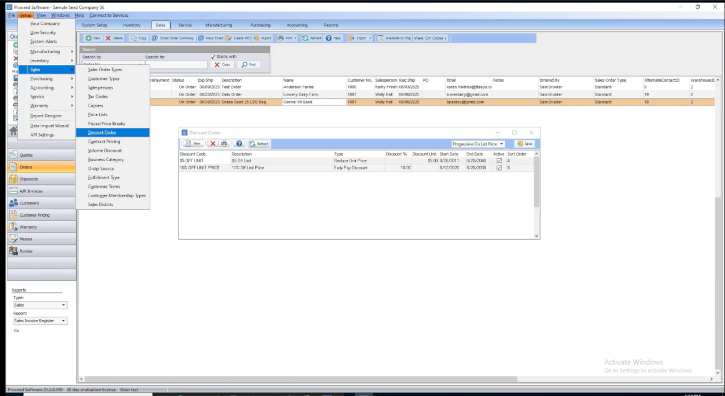
Promotions in Proceed are created by accessing to level Setup and then navigating to Sales -> Discount Codes and then accessing the Discount Codes Utlity. On this screen, you'll see a drop down and in most cases you'll want that drop down to be selected as "Progressive On List Price". Select the drop down and click on "Save" to set this value. This means that promotions are applied to the Quote and Sales Order on the progressive list price as the Promotions are applied. Proceed Software allows you to then apply these promotions to a Quote or Sales Order.
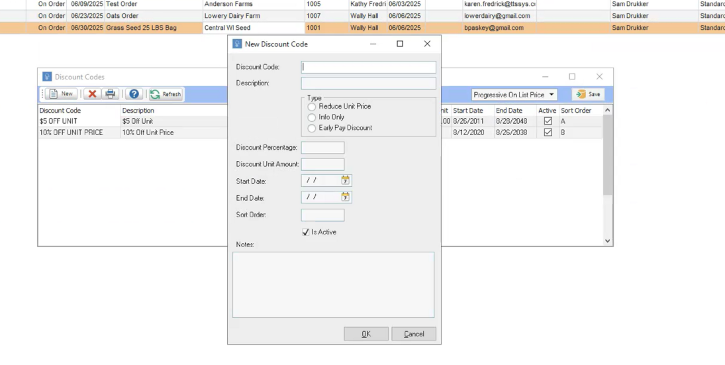
When you create a promotion, you can enter the "Discount Code" and the "Description". Select the tyupe of Promotion you want. A promotion type of "Reduce Unit Price" will automatically reduce the unit price by the value you enter in "Dicount Unit Amount". A promotion type of "Info Only" allows you to add dicount to a Quote or Order but doesn't impact it financially and it's just for information. A promotion type "Early Pay Discount" adds a percent discount to each item based on the unit price as promotions are applied (Progressive On List Price). You can set a start date and end date. You can set a sort order to regulate the order in which the promotions appear on the Sales Order Screen. There is a "Notes" field too and it's suggested that you enter notes about the promotion so that it can be understood from within your user base.
Once your promotions are created, you can then apply those promotions to Quotes and Sales Orders in Proceed. The screen below shows how promotions are applied to a Sales Order in Proceed. Notice that the total sum of the promotions are totaled in the "Discount" field on the Sales Order.