
We use Proceed Software and I'm trying to run a simple balance sheet but one of the GL accounts isn't part of the balance sheet. Does anyone know how to get that GL account to run in the report?
1 Answers
When you add or change a GL account in Proceed, sometimes that account gets orphaned in the General Ledger -> Balance Sheet. In order to fix this, it's best to just rebuild the report perameters. This answer should help you.
On the Balance Sheet Wizard, click on edit.
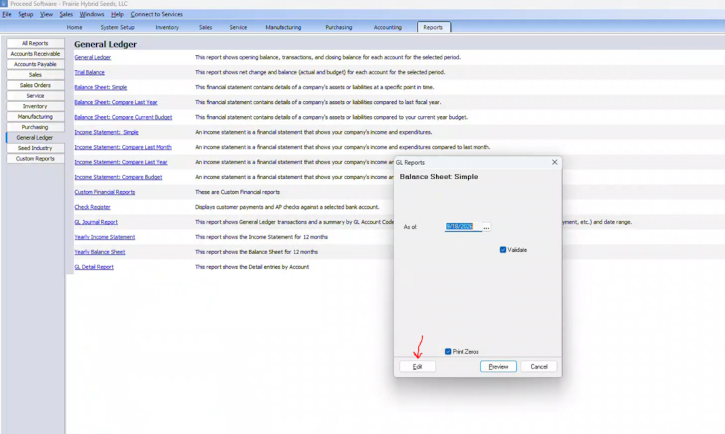
Click on the following “Edit” button.
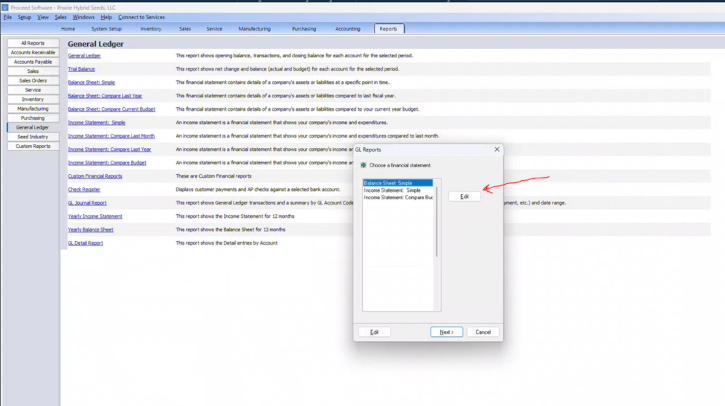
Click on “Edit” again. See where is says "Autofill", this will add all the GL accounts into the General Ledger Report. Sort of resets everything back to zero. Please let us know if this helps you?
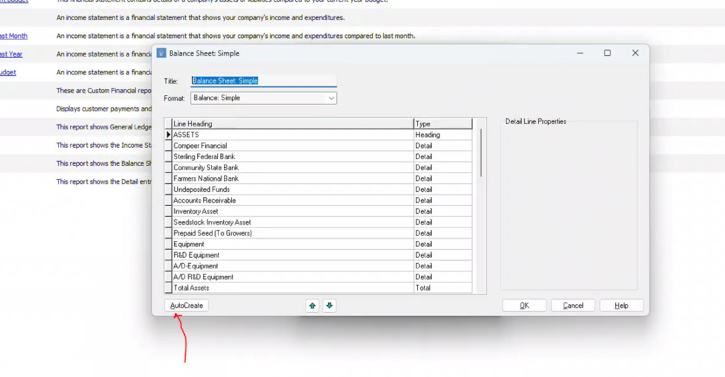
Then click on “AutoCreate”. This will add all the available GL accounts into the Balance Sheet. This only happens when there are new or modified GL accounts added to the report.
Then click on "OK" and it should run the report with all the GL accounts as you would expect.
Related
How do the Customer Terms work in Proceed Software?
1 answers
How do finance changes work in Proceed Software?
1 answers
How does the BigCommerce and Proceed Software integration work?
1 answers
How are the Customer Terms set in Proceed Software?
How do I setup existing accounts receivable into Proceed?
1 answers
I'm trying to create a Balance Sheet in Proceed Software and i'm mising GL Accounts
1 answers