
This article explains how to place an order for Test Plot Seed.
1 Answers
Many times, seed companies have growers that test their seed by planting them in a “Test Plot”; so how do you manage this type of seed transaction specifically in Proceed ERP?
The answer is that you would deliver the test seed exactly the way you would deliver any other seed. You would create an item if it’s a unit you stock, then add it to a Sales Order and follow the same shipment and delivery process you would normally use. If you sell seed by the pound, unit or package, it’s exactly the same process as any other seed.
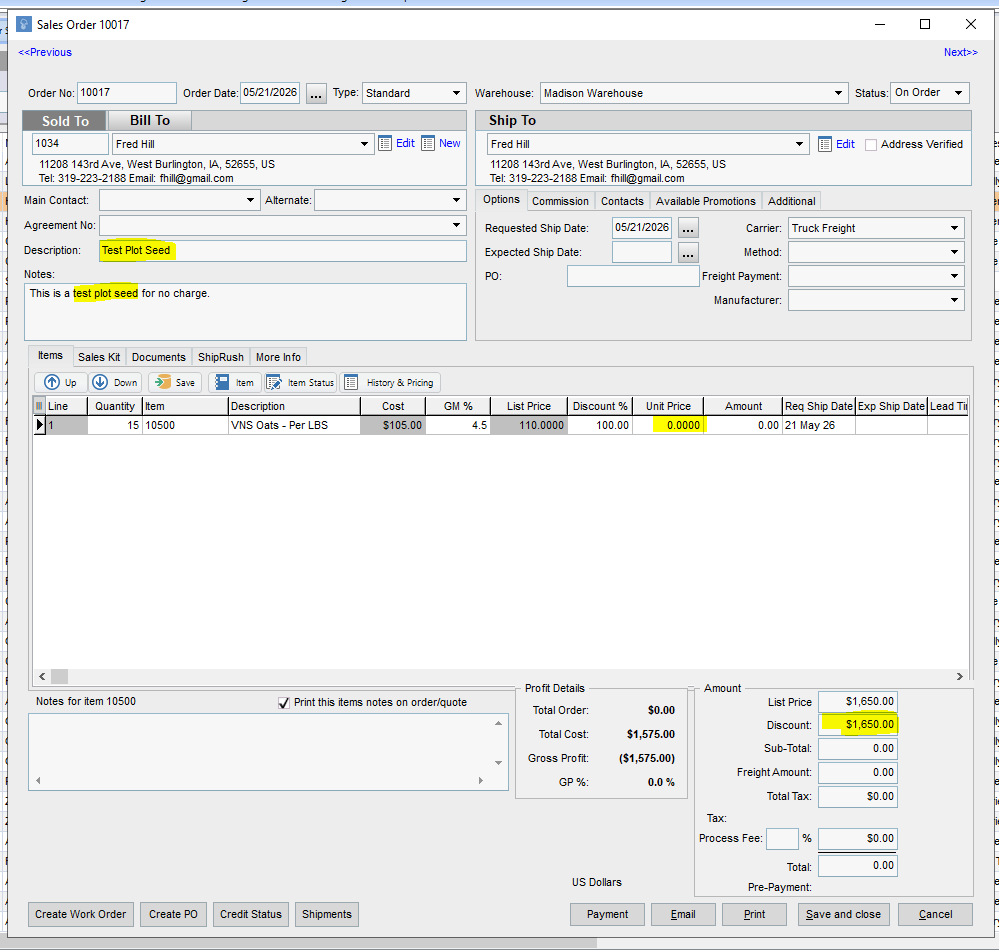
Here are a few suggestions:
- In the Sales Order Description field, write “Test Plot Seed”. This will show up on quotes, sales order, shipments and deliveries. You’ll be able to track the test plot seed all the way through the data flow.
- In this example, we added the quantity of the seed that was ordered but marked the “Unit Price” as $0.00 This creates a discount equal to the amount of the List Price in Proceed and therefore automatically added to your accounting as a discount.
- On the custom seed reports that report “Traits”, orders that have a zero price are typically “free” and won’t report back on most of the trait reports.